IRIS app map and TRINITY services
How the web app, backend services, and data flow fit together—paths you can use today.
From idea to action (retail workflow)
Most traders do not care about service names until something breaks. A repeatable day in IRIS looks like this:
- Scan — watchlists and market views for what moved and what fits your rules.
- Filter — screeners to shrink the universe; discard most names quickly.
- Dig — symbol pages and batch analysis when a name earns attention; treat stages as context, not orders.
- Decide — portfolio settings and risk caps define what you are allowed to do; optimization and Hunt suggest how, not whether.
- Act or wait — manual trade flows, or—only if enabled—automated trading on a schedule you understand.
If you are new, stay on steps 1–4 for several sessions before leaning on automation.
What you use day to day
IRIS is the TRINITY web application: portfolio and watchlist UIs, symbol analysis, onboarding, trade-flow screens (where enabled), and the usual signed-in session you already use. When documentation refers to “the app,” it means IRIS unless stated otherwise.
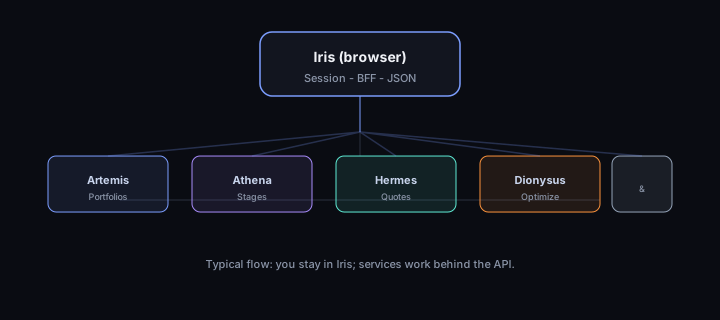
Backend capabilities are split across named services. Everyday use stays inside IRIS—understanding the map helps you interpret labels, errors, and release notes.
Service roles (production architecture)
| Service | Role in the product |
|---|---|
| IRIS | Web UI and session handling—your browser talks to 127.0.0.1:5000 when local, or your deployed IRIS host in production. |
| ARTEMIS | In docs and engineering maps, the ARTEMIS name covers portfolio Hunt and Cash Hunt recommendations (plus related IRIS portfolio flows). Your positions and settings live in IRIS; Hunt/Cash Hunt turn ATHENA analysis, market data, and your risk caps into ranked ideas—see How Hunt and Cash Hunt fit your process. |
| ATHENA | Stage analysis, indicators, batch analysis orchestration, and training/backfill pipelines. Symbol and batch flows in IRIS ultimately depend on ATHENA semantics for stages and scores. |
| ATLAS | Secure portfolio record behind IRIS: your positions, cash, risk and portfolio settings, optional email/automation toggles, portfolio alerts, and saved performance views (including comparisons vs SPY when the app shows them). Demo portfolios—sample books for onboarding—are one slice of this; your own portfolios use the same system. See Your portfolio in TRINITY. |
| HERMES | Market data, symbol metadata, and quote-style payloads used on symbol pages and screeners. |
| DIONYSUS | Portfolio optimization—proposed weights and trades subject to your risk settings. Use Optimize portfolio / TRINITY Optimized Portfolios in IRIS. See Portfolio optimization with DIONYSUS. Integrators: Optimization in the IRIS browser and API. |
| CHRONOS, ECHO, METIS, THEMIS, ARES, CLIO | Supporting services: notifications, scheduling, research helpers, and—for ARES—optional scheduled automated trading for portfolios that opt in (see Automated trading (ARES)). IRIS status aggregates health for several of these. |
ECHO — in engineering maps, the name for outbound email you opt into from portfolio settings and account notification preferences (daily summaries, optional market-wide digests, trade picks, automation notices when enabled). Consumer-oriented detail: Emails and alerts in TRINITY.
Primary app routes (IRIS)
These paths are stable entry points for documentation and support. Your deployment may add feature flags or A/B routes (/new-*, /f/ variants); use the URL shown in your browser as the source of truth.
| Area | Typical path | What you do there |
|---|---|---|
| Home / entry | /, /home-entry | Launchpad after sign-in. |
| Portfolios | /portfolio, /new-portfolio, /portfolio/<id> | Create, list, and drill into portfolios. |
| Watchlists | /watchlists, /watchlist/<id> | Manage symbols and lists. |
| Market | /market, /new-market | Market-wide views and screeners. |
| Symbol | /symbol/<SYMBOL> | Deep dive: price, analysis, stages, related actions. |
| Batch analysis | /batch-analysis | Run multi-symbol analysis workflows from the UI. |
| Learning (this site) | /learning | Redirects to the Learning Center when LEARNING_CENTER_BASE_URL is set. |
| API docs | /api-docs | Redirects to the developer OpenAPI explorer when configured. |
| Status | /status | Aggregated service health for your workspace (open from IRIS when something seems stuck). |
| Onboarding | /onboarding/* | Welcome, risk, portfolio setup, picks, review. |
| Legal | /privacy, /terms, /disclosures, /security, /accessibility | Policies and compliance pages in IRIS. |
API routes and integrations
Retail investors do not need HTTP route lists—use the IRIS screens referenced above. If you are building software on top of TRINITY (or your firm supports integrators), open the Developers documentation site for OpenAPI references, authentication, and browser vs service URLs. This Learning Center stays focused on how to use the product in the app.
Local development quick check
- IRIS:
http://127.0.0.1:5000(see yourrun_local/ deployment docs). - Learning Center (this site):
http://127.0.0.1:4321when runningnpm run devin the trinity-pythia repo. - Set
LEARNING_CENTER_BASE_URL=http://127.0.0.1:4321on IRIS so/learningredirects here.
Support mindset
When something fails, note which page, symbol or portfolio id (if any), and timestamp. Status and logs are partitioned by service—your support or engineering team will map IRIS errors to ARTEMIS, ATHENA, HERMES, or portfolio persistence (ATLAS-backed screens) as needed.
Progress is saved in this browser. Cloud sync requires PUBLIC_IRIS_API_BASE, IRIS CORS allowlist,
and window.__trinityIdToken.