Hunt, Cash Hunt, and optimization
ARTEMIS Hunt modes, cash deployment, and DIONYSUS optimization—what each does and how to use them responsibly.
Which tool should I use?
| Your situation | Start here |
|---|---|
| “Something in my portfolio feels wrong—I want replacements or a health check.” | Hunt (general or symbol-replace mode). |
| “I have cash and want ranked ideas that fit my risk envelope.” | Cash Hunt. |
| “I want a solver-style mix of weights/trades under my constraints.” | Optimization (DIONYSUS proposal—confirm before any execution). |
| “I want the computer to run this on a schedule without me clicking.” | Only after you trust the above—read Automated trading (ARES). |
Overview
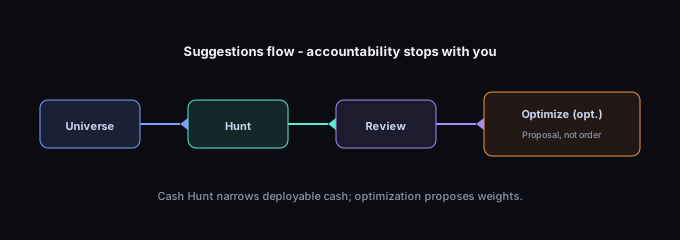
TRINITY offers automation-style helpers that suggest portfolio changes:
| Capability | Primary backend | Where you use it in IRIS |
|---|---|---|
| Hunt | ARTEMIS | Portfolio tools → Hunt (replace, interest, or general modes—labels vary by screen). |
| Cash Hunt | ARTEMIS | Portfolio → Cash Hunt when you have deployable cash. |
| Optimization | DIONYSUS | Optimize portfolio / TRINITY Optimized Portfolios from portfolio builder or detail. |
Each respects risk settings on the portfolio: max positions, max risk per trade, concentration caps, and related fields you configure under portfolio settings. The same ATHENA snapshots can produce different Hunt or optimization outputs after you change those settings—see Policy and constraints in plain language.
Hunt: three conceptual modes
The ARTEMIS hunt endpoint supports:
- General assessment — portfolio-wide health, weak positions (e.g. later-cycle stages where modeled), and swap ideas. Long candidate lists are split across pages in the app so responses stay fast; more ideas may exist after you go to the next page.
- Symbol replace — you nominate a holding to exit; Hunt surfaces replacement candidates, often prioritizing sector coherence when data allows.
- Symbol interest — you ask whether a candidate ticker fits the portfolio; you get suitability-style reasoning tied to stages, diversification, and risk.
Hunt output is suggestive. It can miss liquidity events, tax consequences, and your personal constraints. Always confirm in the app and with professionals when needed.
Cash buffer and deployable cash (Cash Hunt)
Before ranking new buys, Cash Hunt treats part of your capital as a cash buffer—roughly one tenth (10%) of total portfolio capital is reserved as a liquidity cushion. Only deployable cash (cash above that buffer, after other inputs your portfolio uses) is used to size Cash Hunt ideas.
If Cash Hunt looks empty or very small, you may simply have little or no deployable cash after the buffer and your other settings—not necessarily a broken analysis pipeline. See Reading Hunt and Cash Hunt results and FAQ.
Replace vs general mode — why lists can feel different
General Hunt and Cash Hunt often draw replacement or new-buy ideas from a curated universe of symbols the platform has already analyzed to “healthy” stage quality—fast and consistent with what you see elsewhere in TRINITY.
Replace mode may use a wider search first (for example a large market scan) when suggesting swaps for one line, then fall back to the same on-platform analyzed pool if that wider pass returns nothing. So breadth of the list can differ by mode even though ranking and risk rules stay coherent—you are not seeing random shuffling.
Neither mode will suggest a symbol your book already treats as blocked from new exposure—see below.
Symbols that never appear as “new” ideas
Recommendations exclude tickers that still appear in your portfolio’s allocation history, including closed lines the app keeps for record-keeping. That avoids doubling up on names you have already run through this book; it can also explain why a former holding does not show up as a new Cash Hunt pick until allocation data or product rules change.
Cash Hunt
Cash Hunt focuses on deploying deployable cash into new positions (not 1-for-1 swaps). It uses the same risk envelope to propose position sizes as a fraction of portfolio equity where configured.
Use Cash Hunt when you have dry powder and want ranked ideas that respect your limits—not when you are only rebalancing existing names (use Hunt or manual workflows).
Automation and policy: If you use automated trading, merged agent / policy settings can filter which cash ideas appear (for example skipping early-stage names on cash deployment). That is separate from ATHENA “being wrong”—see Reading automation decision logs and Policy and constraints in plain language.
Optimization (DIONYSUS)
Optimization searches for feasible portfolios under your risk settings and optional constraint packs (sector caps, vol targets, turnover budgets on rebalance). The engine reads ATHENA analysis from Firestore, ranks symbols, then applies your chosen allocation strategy (equal, confidence-weighted, stage-weighted, Kelly, or hybrid).
Typical inputs include:
total_capital(minimum $1,000 in API validation) and currency.risk_settings—max_risk_per_trade,max_portfolio_risk,max_position_size,max_positions,allocation_strategy, plus strategy-specific knobs (e.g. softmax temperature, half Kelly).- Optional
constraint_pack,prior_book_weights(rebalance), and investor profile / quiz snapshot for policy audit.
Output is a proposal with allocations, optimizer diagnostics, and a trace_id. Nothing executes until you explicitly confirm in supported trade flows—and paper vs live behavior depends on your environment.
Deep dives: Portfolio optimization with DIONYSUS · DIONYSUS allocation strategies in depth · How DIONYSUS filters and ranks symbols
Pagination and performance
Hunt returns ranked candidate lists that may be longer than one screen. The app uses pagination (next page, or “load more,” depending on the build) so the experience stays responsive.
As an investor, if a list feels “short,” check whether more pages exist—a short first page is usually the first slice of a larger ranked set, not “everything worth buying” or a silent failure.
Whole-share sizing
Hunt and Cash Hunt often show whole share counts for replacements or new buys. Fractional shares are truncated in many paths so suggestions stay executable in common broker workflows. A recommendation can round to zero shares when your risk caps or price imply a very small line—that is a sizing floor, not a hidden error.
Risk settings and policy
Whatever you set under portfolio risk (caps, max positions, per-trade risk, concentration) acts as the envelope for Hunt and Cash Hunt. If suggestions feel too timid or too bold, compare two runs before and after adjusting settings. For how policy language maps to behavior, read Policy and constraints in plain language.
When Hunt and optimization disagree
That can be normal: optimization solves for a whole-book allocation under constraints; Hunt often proposes targeted swaps or cash deployment with a different UX. Slow down, check timestamps on shared symbols, and use Hunt vs optimization: which should I use?.
If Hunt or Cash Hunt fails in the app
- Try again after a short wait; sustained failures often mean a temporary upstream issue.
- Open IRIS Status (from the app) and read Status, delays, and “is it broken?”.
- If a screen says your portfolio cannot be loaded, confirm you are signed into the correct account and that the portfolio still exists.
- Builders and integrators documenting HTTP status codes should use the Developers portal; this Learning Center stays in in-app language.
Ethical and compliance use
Do not present Hunt or optimization output to clients as fiduciary advice unless your firm has reviewed and approved that workflow. TRINITY provides software, not a suitability determination for end clients.
Further reading
- Reading Hunt and Cash Hunt results
- When your symbol page and Hunt disagree
- How Hunt and Cash Hunt fit your process
- From symbol page to Hunt
- Portfolio optimization with DIONYSUS
- DIONYSUS in the TRINITY architecture
- IRIS app map and TRINITY services
- Portfolio basics
- Risk management fundamentals
- Automated trading (ARES)
Progress is saved in this browser. Cloud sync requires PUBLIC_IRIS_API_BASE, IRIS CORS allowlist,
and window.__trinityIdToken.